Lecture notes
Record the lecture. Get notes you can actually study from.
In a few minutes, Notiee turns an hour-long lecture into clear notes: headings, key terms with definitions, a summary, review questions, a mind map and pictures. They are saved straight into the right subject.
In short
In the Notiee app you tap record and let the lecture run (two hours and more). When it ends, you choose “Lecture notes”. The AI transcribes the lecture, groups it by topic and writes study notes. It adds a mind map and pictures from Wikimedia Commons and saves everything as a new note in the subject you chose, or at the end of an existing one. From the notes you make flashcards or a practice test in one tap.
Updated 16 Oct 2026
How it works
- 01
Record
One big button. Recording runs in the background, and the top bar shows it is on.
- 02
Choose “Lecture notes”
Pick the subject and a new note or an existing one. The mind map and pictures are on by default.
- 03
Open the finished note
Within a few minutes you watch the notes being written, then open them in your subject.
Example result
Lecture 16 Oct – Cell organelles
The lecture explained the structure of the eukaryotic cell and how organelles share the work: where energy is made, where proteins are built and where they are packed.
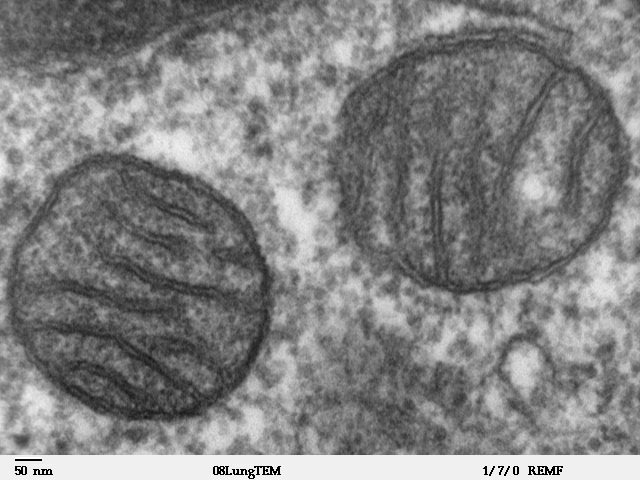
Mitochondria
Mitochondrion – the organelle where cellular respiration produces ATP.
- Two membranes; the inner one forms cristae.
- Its own DNA – a trace of endosymbiosis.
Important: the difference between mitochondria and chloroplasts will be on the exam.
Summary
Review questions
1. Why do mitochondria have their own DNA, and what does it say about their origin?
What the notes contain
- A short overview at the top: what the lecture was about and why it matters
- Topics under headings, not in the order the lecturer jumped around
- Bold key terms with definitions, formulas, dates, names and examples
- Tables where things were compared
- An “Important” callout where the lecturer said it will be on the exam
- A summary and 5–8 review questions at the end
- A mind map of the whole lecture that you can keep editing
- Pictures with author and licence where they help understanding
Why it makes sense
150 vs 22
Lecturers speak 120–180 words a minute; handwriting manages about 22. Nobody gets it all down by hand.
Wong, 2014
61% vs 40%
Students who tested themselves remembered 61% after a week; re-readers remembered 40%. That’s why the notes end with questions and lead into flashcards and tests.
Roediger & Karpicke, 2006
70%
of Czech university students work during the semester. Hours spent rewriting notes are hours missing from actual studying.
EUROSTUDENT VIII
What next with the notes
A summary on its own is a weak way to learn. Notiee follows the notes with what research shows works: retrieval and spaced repetition.
Good to know
- Agree recording with your lecturer and follow your school’s rules.
- The AI only writes what was said in the lecture and adds nothing. Still, double-check what matters, especially numbers and names.
- AI transcription is included in Plus (10 h a month) and Super (60 h). New accounts get a one-week trial with 1 hour. Live transcription while speaking is free and unlimited.
FAQ
How long a lecture can Notiee handle?
A whole lecture, two hours and more. The recording is saved in five-minute parts, so a dropped connection doesn’t lose it. In the mobile app, recording continues with the screen locked.
How long until the notes are ready?
For an hour-long lecture, usually a few minutes. You see each step (transcribing, writing, mind map, pictures, saving) and the notes as they are written. You can close the window; processing finishes in the background.
Can I add the notes to a note I already have?
Yes. Before processing you pick the subject and either a new note or the end of an existing one.
Where do the pictures come from, and may I use them?
From Wikimedia Commons, where works are under free licences. Each picture shows its author and licence. Pictures are only added for things that can be shown, like a cell structure, a map or a historical figure.
What language will the notes be in?
The lecture’s language. It is detected automatically and the notes are never translated.
How is this different from ChatGPT or NotebookLM?
Recording, transcription, notes, mind map, flashcards, tests and a study plan live in one app, and the notes are saved straight to your subject. Nothing to copy between tools, and you go from notes to studying, not just to reading a summary.
Record your next lecture.
A free one-week trial. After it, everything without AI stays free, including live transcription.
Start free